Configurations
This page mostly focuses on how configurations and related features are implemented. A good understanding of the high-level concepts is therefore required.
Defining platforms
A platform is simply a target with at least a
PlatformInfo. That target can be an
instance of a custom rule, or it can simply use the prelude's
platform rule:
platform(
    name = "my_platform",
    constraint_values = [
        "//constraints:build_mode[debug]",
        "//constraints:cpu[x64]",
    ],
)
The configuration is actually part of the analysis result of the
platform target (the
ConfigurationInfo provider
instance). This is convenient from an implementation standpoint, but it
leads to a situation where some nodes are analyzed with an "unbound"
Configuration.
All the rule types involved in defining a platform may be analyzed with an
unbound configuration (platform(), config_setting(), constraint_setting(),
and so on). These are sometimes called "configuration rules". This means that
all the attributes of these rules are not selectable.
Configurations also reference a few other provider instances such as
ConstraintSettingInfo. All of these end up being potentially produced in a
context with an unbound configuration.
Using analysis for this also means that "configuration" and "analysis" are not distinct phases within a build (although they are still distinct for a node and are still conceptually useful).
Execution platforms
To Buck, both execution platforms and the list of them are based on
ExecutionPlatformInfoandExecutionPlatformRegistrationInfo, but we’ll talk in terms of theexecution_platformandexecution_platformsrules.
There are three main concepts to understand about execution platforms:
- Execution platforms
- Execution deps
- Execution platform resolution
Execution platforms
The simplest execution platform setup is the one buck2 init uses. This
setup gathers constraints from the host machine Buck is running on.
[parser]
  target_platform_detector_spec = target:root//...->prelude//platforms:default
[build]
  execution_platforms = prelude//platforms:default
For many projects, this will suffice, and your target and execution platform will be the same (until you provide a config modifier, which applies only to the target platform). But the target/exec distinction forms the basis of all kinds of cross compilation and remote build execution. You can use these to express "I want to compile code that will eventually run on Windows, but all the build tools and compilers should run on my local Linux computer". In that case the target platform is Windows, and the execution platform is Linux. You can imagine exotic situations in which the compiler itself has to be compiled first, on yet another execution platform.
More complex setups are possible. You can:
- Add more constraints and configure code differently when it will be executed in a build step (e.g. release mode, for faster builds of everything else).
- Set up cross compilation, in conjunction with toolchains that will provide the right flags.
- Let buck automatically select from multiple execution platforms depending on what's being built (for example, most of the build can be done on Linux, but the linker might only run on Windows).
Custom execution platforms
The process for fully specifying your own execution platforms is:
-
Create a target that exposes an
ExecutionPlatformRegistrationInfo(platforms = [...])provider. Each platform is anExecutionPlatformInfo, which has its ownConfigurationInfo(a set of constraints describing it, e.g. it's an x86 server running Linux). ThisConfigurationInfois used for exec platform resolution/compatibility, and also to configure software that will run there. So often you will tell it you want all build tools to be built themselves in release mode, so your builds are faster. -
Configure the
build.execution_platformsvalue in your.buckconfigto point to this target:[build]
execution_platforms = platforms//:my_exec_platforms
Here’s an example definition of execution platforms.
execution_platform(
    name = "mac-exec",
    platform = "//platforms:mac-arm64-opt",
    local_enabled = host_info().os.is_macos,
    remote_enabled = True,
    use_limited_hybrid = False,
    remote_execution_use_case = "buck2-build",
    remote_execution_properties = {
        "platform": "mac-re"
    },
)

execution_platform(
    name = "windows-exec",
    platform = "//platforms:windows-arm64-opt",
    local_enabled = host_info().os.is_windows,
    ...
)

execution_platform(
    name = "linux-exec",
    ...
)

execution_platforms(
    name = "exec-platforms",
    # In practice, may want to change this order based on the host os.
    platforms = [
        "linux-exec",
        "windows-exec",
        "mac-exec",
    ],
    fallback = "error",
)
This sets us up with three execution platforms, one for each of Windows,
macOS, and Linux. We choose a more optimized configuration for that
platform (i.e. opt instead of dev). Generally for build tools we
recommend using an optimized form, as most of the time the build will be
executing the prebuilt tools rather than building them.
In simple cases you will only have one execution platform, and the story ends there.
In more complex cases, you may have multiple execution platforms. For
example, you may have a remote build farm that has both Linux and
Windows machines. When a build is requested for a particular configured
target, Buck will iterate the platforms provided in the registration
provider, and select the first platform whose configuration matches the
execution constraints. Basically, some build tools only run on Linux, so
if the tools need to be built, Buck will configure them to be built for
Linux, and then when it comes time to run them, it will schedule them to
run under the Linux execution platform. Other build tools (a
cross-platform python script) could run anywhere and these will not
influence the choice of exec platform for a given target. The
ExecutionPlatformInfo provider that is ultimately chosen supplies
key-value data that is sent to the remote build farm that can be used to
comply with the request, like "OSFamily": "linux" or a given Docker
image. You could have dozens of auto-generated execution platforms, or a
few well-known platforms that are maintained and rotated as you migrate
infrastructure over time.
Execution deps
Some target deps are "execution deps". These are the dependencies of the
target that should be built for the execution platform. For example, a
compiler or other build tool would be an execution dep. This includes
all exe string parameter macro deps (for
example, $(exe //:tool)) and includes all attrs.exec_dep() deps.
An exec dep differs in two ways from a normal dep:
- Its target platform will be set to the resolved exec platform of the dependent. Normal deps simply inherit the target platform.
- It influences which exec platform is chosen for a dependent target. This is covered in exec platform resolution below.
Aside from the way they interact with dependents, exec deps are regular
targets in the build graph. They may themselves be compiled using their
own exec_deps, and therefore may need to select their own exec platform
based on their own exec deps. Each time a target somewhere in the build
graph has exec_deps, Buck will do another transition through exec
platform resolution.
You might not notice an incorrectly typed dependency edge if your only registered execution platform = your target platform = your host machine and you don't do much build configuration, but it matters once you start writing your own build tools and compiling for platforms other than your host machine. The typical error when you have misconfigured is "exec format error" on Linux, where Buck is trying to execute e.g. a Windows executable on a Linux machine.
Execution platform resolution
During analysis, unlike target platform resolution, every configured node undergoes execution platform resolution independently (see exception below). This means that even for a specific target platform, different nodes in the graph can be built on different execution platforms.
This works roughly as follows:
next: for platform in execution_platforms:
    if exec_compatible_with(target, platform):
        for dep in target.execution_deps():
            if !target_compatible_with(dep, platform):
              continue next
        return platform
return err
One important note here is that until the execution platform has been resolved, the configuration for execution deps is not known. Only after execution platform has been resolved can the execution deps be configured (also, analysis for them can only be performed at that point).
For the normal use case, a particular configured target node performs execution platform resolution a single time. The execution platform is not encoded in output paths.
Regarding target compatibility, imagine the following pseudo-code for the
target_compatible_with() function above:
def target_compatible_with(target, cfg):
    for constraint in target.target_compatible_with:
        if not satisfied(constraint, cfg):
            return False

    if len(target.compatible_with) > 0:
        found_satisfied_constraint = False
        for constraint in target.compatible_with:
            if satisfied(constraint, cfg):
                found_satisfied_constraint = True
                break
        if not found_satisfied_constraint:
            return False

    for (dep, dep_cfg) in direct_deps(target):
        # NB: recursive call
        if not target_compatible_with(dep, dep_cfg):
            return False

    return True
Toolchain deps
In addition to attrs.exec_dep(), there is also
attrs.toolchain_dep(). Toolchain deps must always point to an instance
of a toolchain rule. They are much like
macros for adding one or more exec deps, configuring
them a little, and storing them in a convenient provider structure.
This intuition holds when considering configuration, as toolchains and macros share two main properties:
- Toolchain deps have the same target platform as whatever uses them.
So if you
select()in the parameters to a toolchain rule, you match on how the dependent target was configured. Many toolchain rules allow you to set defaults or base flags for a given target platform in this way. - Toolchain deps inherit exec configuration from the exec platform resolution of the dependent target. This means the exec deps of the toolchain behave as if they were attached directly to the dependent target. They participate in exec platform resolution for the dependent, so Buck2 finds an exec platform that is compatible with all the tools in the toolchain.
This has many benefits:
- It saves you from having to put the same few
attrs.exec_dep()s on a bunch of different rules for the same programming language. - It "delays" the exec_dep transition and provides a point of configurability before this happens.
- It bundles all configurability into one spot. The user can instantiate
a toolchain at a known location (usually
toolchains//:languagename) that includes exec deps or paths to binaries and configures it all in one go.
As mentioned above, toolchain targets don't select their execution platform but instead inherit the execution platform of whatever target references them. In some sense, execution platform resolution sees through them.
This is illustrated in the following example:
some_regular_rule(
    name = "A",
    toolchain = attrs.toolchain_dep(default = ":B"),
)

some_toolchain_rule(
    name = "B",
    tool = attrs.exec_dep(default = ":C")
)
The above means that :C will be an execution dependency of :A and any
select()s defined in :B would be evaluated against the same target platform
as :A (as target platform gets inherited by attrs.toolchain_dep()s).
Visualizing configuration concepts
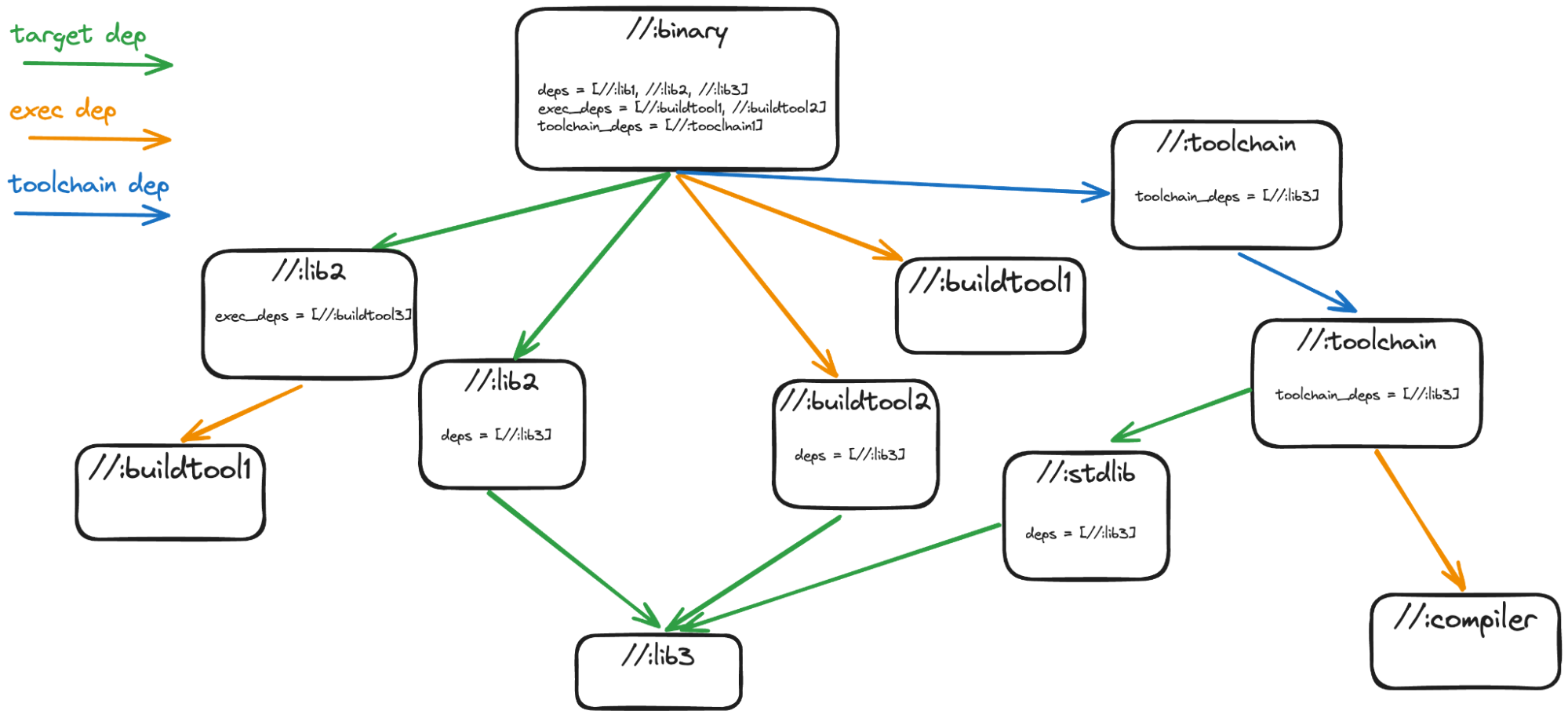
Graph with deps
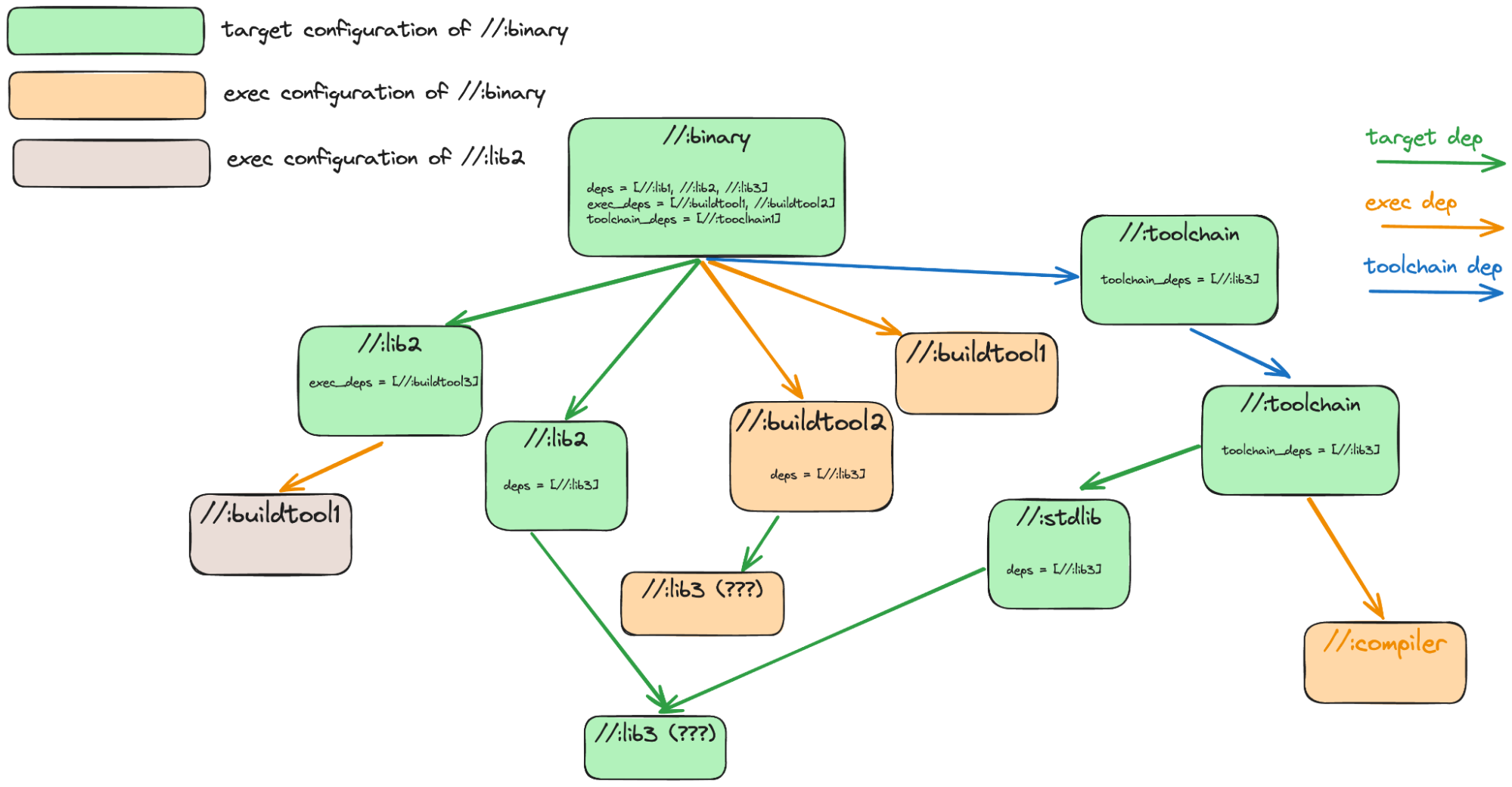
Splitting //:lib3
As we work out the configurations here, //:lib3 will end up being in two
different configurations, so gonna be easiest to split it now.
Execution Platform resolution
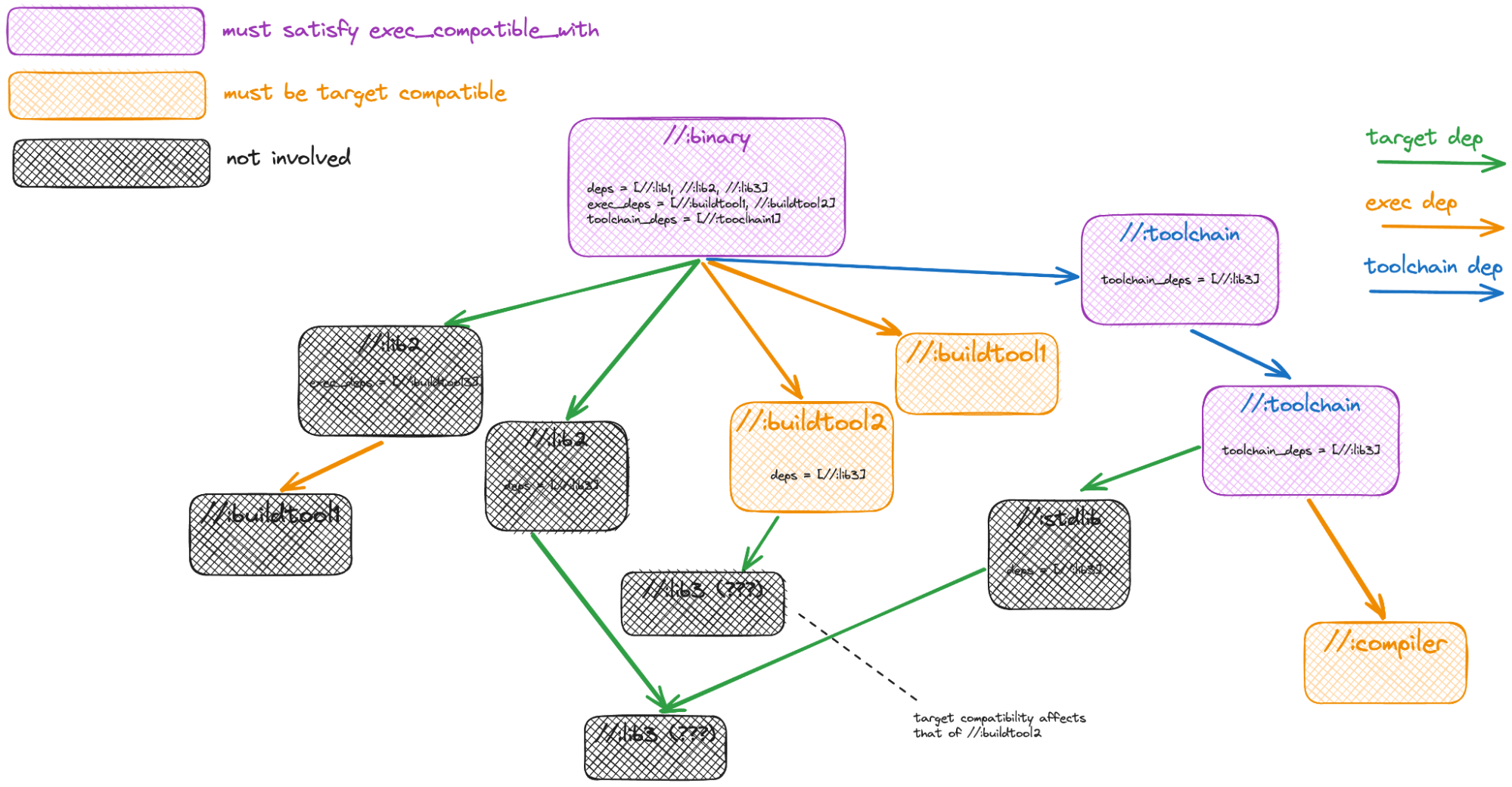
This shows which nodes are involved in determining the exec configuration for
the //:binary target. The exec deps of //:binary and the exec deps for the
(transitive) toolchain deps of //:binary are the main things involved, that set
of exec deps must all be target compatible with an execution platform for it to
be selected. In addition, the target itself and its toolchain deps must be
exec_compatible_with. It is very rare to use exec_compatible_with, for the most
part exec platform restrictions should be marked on target_compatible_with of the
tools that require these restrictions.
Target configurations